How a Microsoft 365 bill drifts
Most Microsoft 365 waste comes from licences still being paid for after the person has gone, or bought for someone who never needed them. It builds up a few pounds at a time, it rarely shows on the invoice as a problem, and in most businesses nobody is checking licences against the people who actually work there.
Nobody sets out to pay for licences they are not using. It happens one small step at a time, and the most common cause is the simplest one: somebody leaves, and their account and licence are never shut down.
HR knows they have gone. That news does not always reach whoever looks after the IT, so the licence carries on billing, month after month, for a person who no longer works there.
Starters add to it from the other side. Licences get bought ahead of a new hire who then starts late or not at all, or a few extra are kept back just in case. Each one is a small, sensible decision on the day. Added up over a year, they are a line on the bill that nobody can explain.
Taking a licence off someone does not cut the bill
This is the part that catches people out. Removing a licence from a user frees it up, but you are still paying for it. It sits in the subscription as unassigned until somebody reduces the number of licences you are buying.
Reducing that number is not something you can do whenever you like. Microsoft only lets you remove licences from a subscription during a limited window after you buy or renew it, and for many accounts its own guidance puts that window at seven days. Miss it, and you carry those licences until the next renewal.
That is why timing matters. Finding the waste in month three of an annual term still helps, because you know exactly what to cut when the window opens. Finding it the week after renewal has passed means paying for another year of it.
It is a security problem before it is a cost problem
An account that is still live after someone has left is not just money going out. It is a working login to your email, your files and your systems, belonging to someone you no longer employ, and nobody is keeping an eye on it. If that password turns up in a breach somewhere else, it still opens the door.
What should happen when someone leaves
Microsoft publishes its own checklist for removing a former employee. In plain terms, it comes down to this order:
- Block sign-in stop the account being used and sign it out of every device and session, the same day they leave.
- Keep their email turn the mailbox into a shared mailbox, or forward it to whoever is taking over, so customers writing to that address still reach someone.
- Hand over their files give a colleague access to their OneDrive and email before the account is deleted.
- Free the licence remove it from the account once everything is safe.
- Reduce the subscription bring the number of licences down at the next window, so the saving actually reaches your bill.
A shared mailbox can hold up to 50 GB without a licence of its own, so keeping a leaver's email does not usually mean keeping their licence. It is the last step that most often gets missed, and it is the one that saves the money.
What Tora watches
Tora, the platform we built to run our service, checks your Microsoft 365 continuously rather than once a year. It looks for three things:
- Licences nobody is using paid for and sitting unassigned, often bought for a starter who never arrived or kept back just in case.
- Accounts left open after someone has moved on still licensed and still able to sign in.
- Settings that are not right configuration that has drifted from where it should be.
When it finds one, it flags it to us as it happens, so it gets dealt with that week rather than at the next renewal.
What the review looks like
The licence review breaks each product down into licences in use, licences unassigned and licences still held by leavers, and puts a monthly figure on the waste. This example is the one from our brochure:
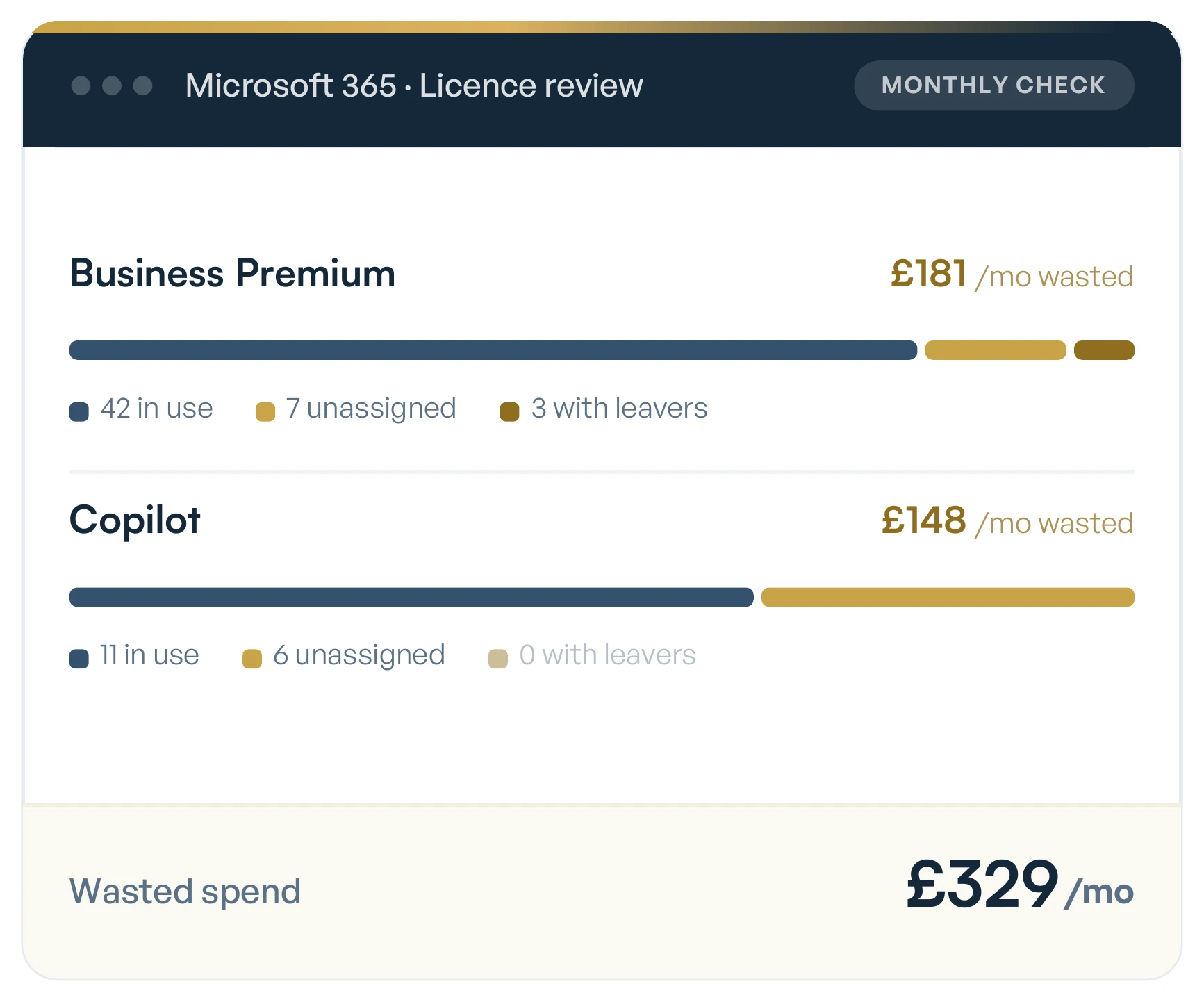
- Business Premium 42 in use, 7 unassigned and 3 still assigned to leavers, wasting £181 a month.
- Copilot 11 in use and 6 unassigned, wasting £148 a month.
- Total £329 a month going on licences that nobody is using.
That is close to £4,000 a year from two products, and none of it was a decision anybody made.
Look at where the money goes. Business Premium has more seats going to waste, ten against six, but in this example each unused Copilot seat costs more than an unused Business Premium one. Six idle Copilot seats cost almost as much as ten idle Business Premium seats.
The savings come back to you
When the review finds waste, the saving is yours. That is true even when what we find means you spend less with us, because a provider who only looks for problems that make them money is not really looking after you.
It also means somebody is always watching the detail. Leavers are the obvious case, which is why the leavers form in our client portal lets you choose exactly what happens to someone's account, data and licences on the day they go.
Questions we get asked
Three questions tend to follow once people start looking at their own licences.
Is an unused licence the same as an unassigned one?
No. An unassigned licence is paid for but not given to anyone. A licence can also be assigned to someone who no longer works for you, which is worse, because the account is still live. The review shows both.
Do I lose a leaver's email if I take their licence away?
Not if it is handled in the right order. Converting their mailbox to a shared mailbox keeps the email and the address working, and a shared mailbox under 50 GB does not need a licence.
How often should licences be checked?
More often than once a year. Tora checks continuously and flags what it finds to us as it happens, so by the time your renewal comes round the numbers have already been worked out.
Check it against your own bill
Take your last Microsoft 365 invoice and count the licences on it. Then count the people who actually work for you today. If those two numbers are different, and they usually are, the gap is money you are spending on nobody.


